
How to Search the Thornton Court Docket
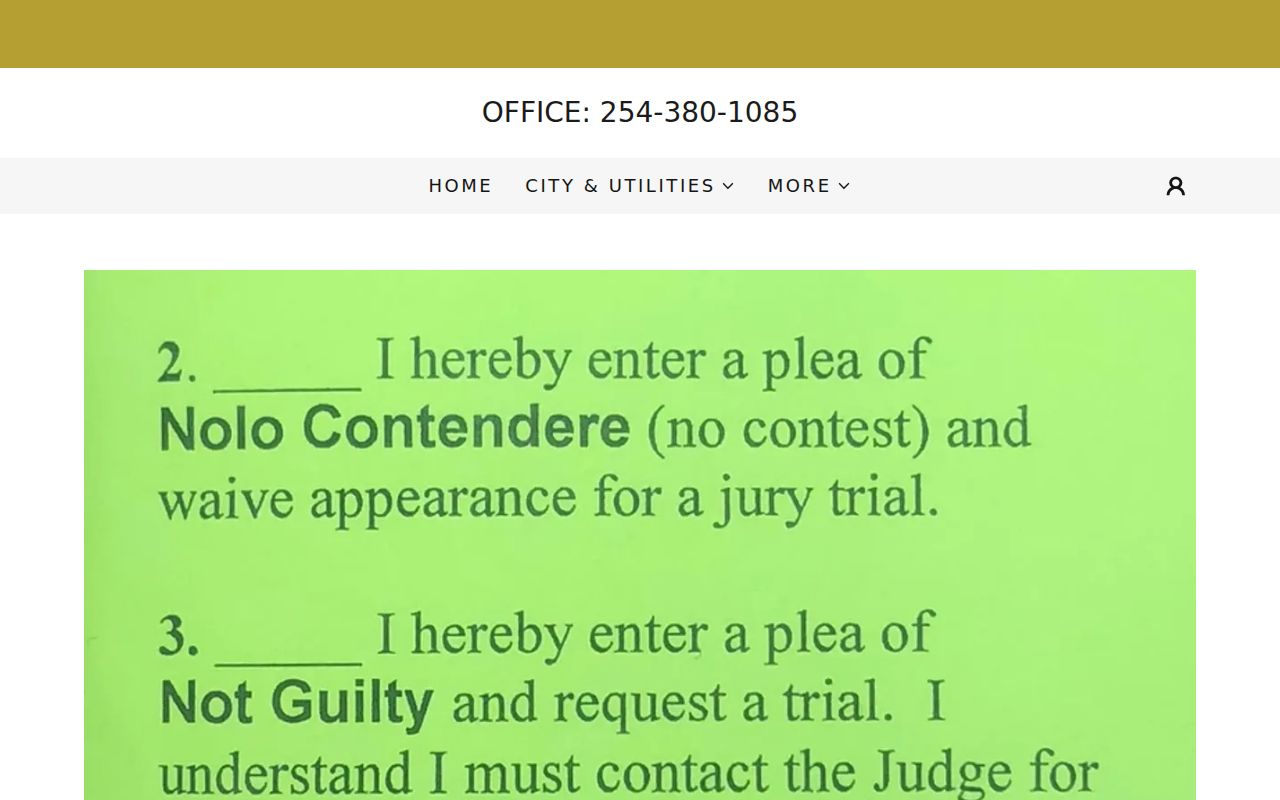
The Thornton Municipal Court page offers a plea form you can download. It also has a button for paying a citation. That is where the online options end. The court publishes no search fields, no calendar, and no case index on its site. Your citation number plus a call to 254-380-1085 is the real docket lookup. When you reach the clerk, confirm your filing arrived. Then ask which setting is active now, and check whether the court still needs anything else from you.
- Read the full court name on the citation.
- Gather the citation number and appearance date.
- Use the Thornton court page for the official form or pay route.
- Call the clerk for the current docket status and setting.
- Move to a Limestone County clerk only if that court filed the case.
Thornton Search Gap Explained
A payment button only finds your fine. It does not display the filings, pleas, orders, resets, or final outcome that make up a Thornton docket. A blank plea form has its own limit too. Sending one starts your response, yet it proves nothing about whether the clerk received or accepted it.
Use the clerk for status. A failed payment lookup does not prove dismissal, no filing, or a warrant.
Ask the clerk for the most recent docket event and what the court needs next. Keep a copy or receipt of anything you submit, whether online, by mail, or in person.
The Thornton Municipal Court
Thornton Municipal Court hears city ordinance violations and Texas Class C misdemeanors. Most city traffic tickets land there too. It stands apart from the Limestone County justice courts, County Court, and District Courts. Directory listings name M. L. Nance as presiding judge. Assignments can change, though, so confirm with the live court. The city's page centers on plea forms and payments rather than a docket index. So calling the clerk is the reliable way to learn a current setting, a plea's status, or how to get a copy. Staff can explain procedure and the record itself. What they cannot do is pick a plea for you or hand out legal advice.
Thornton Plea Form Route
If you hold a Thornton traffic citation, the city's instruction is simple. Download the plea form and return it to the court. Or mail it to PO Box 396, Thornton, TX 76687-0396. Always pull the current blank form from the official court page. Never paste real license numbers or birth dates into any public example. Before the envelope goes out, confirm the deadline, how the court wants it signed, and whether extra documents must ride along. Mail takes time to post. Once it should have arrived, call the Thornton clerk. Then ask whether the form shows up on the municipal docket yet.
Thornton Court Dates and Settings
Thornton posts no online calendar. Read the appearance date straight off the citation, then verify it with the court by phone. Already sent a plea form or request? Ask whether that date still stands. A reset merely moves a hearing to a new day. It is not a dismissal.
| Date | Current date in the clerk's Thornton docket |
|---|---|
| Time | Required reporting time confirmed by court staff |
| Location | Physical or other approved setting location |
| Judge | Judicial officer assigned to the session |
| Setting Type | Appearance, pretrial, trial, or compliance setting |
Thornton Contact Details
The OCA directory gives the court's working contacts: 254-380-1085, fax 254-380-1140, thorntoncourt@amaonline.com, and PO Box 396. The city page favors mail and online responses. It lists no office hours and no exact session location, so confirm both before you drive over.
Thornton Municipal Court
PO Box 396
Thornton, TX 76687-0396
254-380-1085
Fax: 254-380-1140
Ask for current appearance, plea, and record-request instructions.
Email works for quick procedure questions. Mail suits formal documents. Ask the court before sending sensitive details by email.
Thornton Traffic Tickets
That pay button is a transaction tool, not a Thornton case search. Check the citation number and the amount. Then weigh what a payment does to your plea, and the deadline, before you submit anything. If the tool cannot find your citation, call the court. Entry can lag. Or a different court may hold the case. Contesting, filing a plea form, and paying are three separate paths, so follow the court's current instructions for whichever you choose. For the wider split among municipal, justice, and county traffic channels, see Limestone County traffic court records.
Thornton Municipal Activity Counts
The OCA Municipal Activity by City report tracks a single fiscal year, September 1, 2022 through August 31, 2023, and lists Thornton's 2022 population as 421. Its case math is straightforward. The court opened the period with 171 active or pending matters, saw 79 reactivated and 71 newly added, disposed of 37, and closed with 152 active or pending. Those are the clerk's own workload figures.
Read the totals as workflow, not people or convictions. A reactivated case can rejoin the active count, so numbers can overlap. Only the live Thornton docket tells you where one citation stands.
Where Thornton Cases End Up
Not everything that happens in Thornton lands in Municipal Court. County misdemeanors and certain county civil filings go through the County Clerk. The District Clerk holds district criminal, civil, family, and juvenile files. Justice Court Precinct 4 sits in Mexia. It keeps its own records, fully separate from the city docket.
Docket flow: Thornton Municipal Court › Limestone County Courts › District Court
Treat that split as a jurisdiction ladder, not an appeal map. Search the Limestone County court docket only after a document names a county-level court.
Thornton Versus JP4 Records
Thornton Municipal Court and Limestone County JP4 both handle low-level matters, yet their dockets never merge. The state directory puts JP4 in Mexia. A Thornton address or an incident spot cannot tell you which office owns the case. Only the court printed on the citation can.
| Record clue | Thornton Municipal | Limestone JP4 |
|---|---|---|
| Government level | City | County precinct |
| Primary record holder | Thornton clerk | JP4 office |
| Search route | Form, pay button, direct request | Precinct channel |
Give the full court name whenever you ask for help. That one habit keeps your request out of the wrong office.
Public Access to Thornton Court Records
Thornton Municipal Court can hand you a specific docket entry, an order, a disposition, or a plain or certified copy. Have your details ready. Give the clerk the citation number, the party name, the approximate date, and how you want the copy returned. Texas handles judicial records under its own access framework. The Texas Public Information Act does not sweep aside every seal, confidentiality rule, or limit on protected personal data.
Key Rules:
Texas Public Information Act covers public information of governmental bodies, with exclusions and exceptions.
Texas judicial open-records policy describes the separate route for judicial administrative records.
Texas Judicial Directory provides an official contact check.
Public access does not mean the clerk repeats every field on a form. Restricted data can be withheld or redacted. Ask about fees and certification before you pay.
Thornton City Source Check
The official Thornton city site lays out the municipal web route, including the plea and citation path for the local court docket.
The city page also shows what it does not offer: no visible docket-result fields. For local government context, the official city source is the place the clerk points to.

Confirm the actual court-session location before you visit.
Thornton Docket Request Details
A focused request beats a broad one. Tell Thornton Municipal Court the citation number. Give the party name exactly as printed. Add the approximate citation date and the specific record you need, whether that is a docket sheet, disposition, order, or copy of a filed notice. Ask if the clerk can send it by mail or email and what fee applies.
No citation number? Describe the issuing agency and date instead. Keep personal data to the minimum the court needs. Let the clerk tell you which identifier works. Never guess a cause number or put private details into an ordinary public message.
Thornton Submission Follow-Up
Keep the exact version of any Thornton form you send. Note the mailing or upload date, and hold onto proof of delivery. Once enough processing time has passed, call the court with your citation number. Ask whether the submission has been entered. If a setting changed, get the new date in writing when you can. Get response instructions in writing too.
Silence is not confirmation. It does not mean a plea was accepted or a court date removed. The live docket plus a direct clerk answer is the safest status check.
Reading Thornton Docket Labels
The label "active or pending" only means one thing. A matter sat in the report's open-work category at a point in time. "Reactivated" means the reporting system put a matter back into activity. Think of "added" and "disposed" as movement during the period. No label tells you the facts or the result of a case.
- Setting
- A scheduled court event.
- Disposition
- The recorded resolution or outcome of a case.
- Reset
- A setting moved to another date.
Treat the OCA totals as institutional context only, and go to the Thornton clerk for a current case record.
Thornton Payment Record Check
Pay by the citation button? Save the confirmation number, date, amount, and payment method. Ask Thornton court staff when the payment should post. Ask whether a plea or other action is still due. A receipt does not show the whole court record.
If the button finds no match, check the number and the court name. The citation may not be entered yet, or another court may hold it. A blank result does not mean dismissal or a warrant. The clerk can check the municipal docket and give you current instructions.